

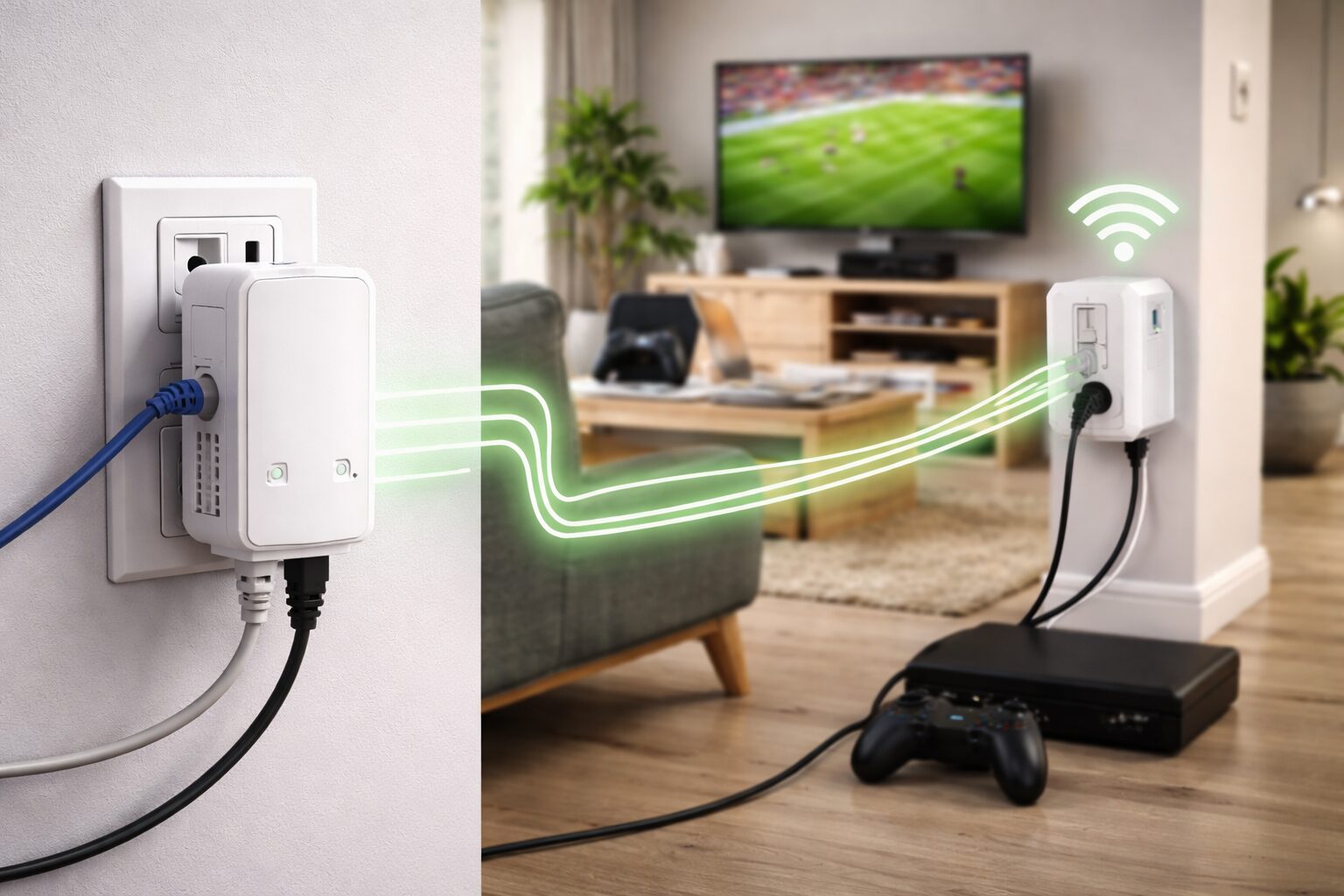
A slow or unstable home internet connection can be frustrating. Video calls freeze, online games lag, and streaming turns into endless buffering. These issues often occur because Wi-Fi signals struggle to reach every room—especially in large homes, thick walls, or older layouts—making a powerline adapter a reliable solution for improving coverage and stability. Many people try Wi-Fi extenders or mesh systems, but these don’t always fix the problem. That’s where a powerline adapter becomes a practical and affordable solution.
A powerline adapter uses your home’s existing electrical wiring to send internet data from one room to another. No drilling, no long Ethernet cables, and no complex setup. In this guide, you’ll learn how a powerline adapter works, its benefits, limitations, and when it’s the best choice for improving home networking.
What Is a Powerline Adapter?
A powerline adapter is a networking device that sends internet data through your home’s electrical wiring. Instead of relying on Wi-Fi signals traveling through the air, it uses power outlets to deliver a wired-like internet connection in different rooms.
Basic Concept
A powerline adapter uses your home’s existing electrical wiring to transmit internet data from your router to other rooms. By plugging adapters into wall outlets, you can extend a stable internet connection without running long cables or relying on weak Wi-Fi signals.
How It Differs From Wi-Fi Extenders and Mesh Systems
| Feature | Powerline Adapter | Wi-Fi Extender | Mesh Wi-Fi |
|---|---|---|---|
| Uses electrical wiring | Yes | No | No |
| Signal stability | High | Medium | High |
| Setup complexity | Very easy | Easy | Moderate |
| Cost | Affordable | Affordable | Expensive |
| Best for thick walls | Yes | Often weak | Yes |
How a Powerline Adapter Works
A powerline adapter works by sending internet data through your home’s existing electrical wiring. One adapter connects to your router using an Ethernet cable and plugs into a wall outlet. It converts internet data into electrical signals that travel through the power lines. A second adapter in another room receives these signals and turns them back into internet data, giving you a stable connection without relying on Wi-Fi.
Here’s how it works:
- Your router sends internet data to the first powerline adapter via Ethernet cable.
- The adapter converts data into electrical signals.
- These signals travel through your home’s electrical wiring.
- The second adapter receives the signals and converts them back into internet data.
- You connect your device using Ethernet or Wi-Fi (depending on the model).
Plug-and-Play Setup Explained
Most powerline adapters are plug-and-play, meaning:
- No software installation
- No technical skills required
- Setup takes less than 5 minutes
Steps:
- Plug adapter #1 near your router
- Plug adapter #2 in the target room
- Press the “Pair” button
- You’re connected
Benefits of Using a Powerline Adapter
Using a powerline adapter offers several practical benefits for home networking. It provides a more stable internet connection than Wi-Fi in hard-to-reach rooms, helping reduce dropouts and buffering. Powerline adapters improve coverage without drilling holes or running long Ethernet cables, making setup quick and simple. They also deliver lower latency, which is ideal for online gaming, video calls, and HD or 4K streaming.
What types of devices can I connect with my powerline adapter?
You can connect almost any device that uses an internet connection to a powerline adapter, including:
- Computers and Laptops – For stable work-from-home or gaming setups.
- Smart TVs and Streaming Devices – To watch HD or 4K content without buffering.
- Gaming Consoles – PlayStation, Xbox, or Nintendo with lower latency for online gaming.
- Smart Home Devices – Security cameras, smart hubs, or IoT devices that need consistent connectivity.
- Printers and Network Storage (NAS) – For fast file sharing and backups across your home network.
Many modern powerline adapters also feature Wi-Fi access points, allowing wireless devices like smartphones and tablets to benefit from extended coverage.
Is it safe to use a powerline adapter at my home?
Yes, it is safe to use a powerline adapter at home. Powerline adapters are designed to meet electrical safety standards and use encrypted data transmission, so your internet traffic stays private. They do not affect your home’s electrical system or appliances and consume very little power—similar to a phone charger. When plugged directly into a wall outlet and used as instructed, powerline adapters are a safe and reliable networking solution.
What are the limitations of using a powerline adapter?
While powerline adapters are convenient for extending internet coverage, they have some limitations. Their performance depends on the quality of your home’s electrical wiring, and speeds can drop over long distances or across multiple circuits. Large appliances may cause electrical interference, and adapters should be plugged directly into wall outlets rather than power strips. Additionally, mixing different brands or older models may cause compatibility issues. Despite these factors, powerline adapters remain a practical solution for improving home networking in areas where Wi-Fi struggles.
Visual Comparison: Powerline vs Wi-Fi Performance
Average Home Network Performance

Connection Type      Stability     Latency     Speed Consistency
---------------------------------------------------------------
Wi-Fi (Far Room)     ★★☆☆☆        High        Low
Wi-Fi Extender       ★★★☆☆        Medium      Medium
Powerline Adapter    ★★★★☆        Low         High
Ethernet Cable       ★★★★★        Very Low    Very High
Powerline Adapter vs. Wi-Fi Extender
Speed and Reliability Comparison
Wi-Fi extenders rebroadcast your existing Wi-Fi signal. This often causes:
- Speed loss
- Signal interference
- Unstable connections
Powerline adapters don’t rebroadcast Wi-Fi. They deliver data directly through wires, making them more reliable.
Best Use Cases for Each Solution
Choose a powerline adapter if:
- You need stable internet for work or gaming
- Wi-Fi can’t reach certain rooms
- Running Ethernet cables isn’t possible
Choose a Wi-Fi extender if:
- You only need light browsing
- Walls are thin
- Budget is very limited
When a Powerline Adapter Is the Best Choice
Large Homes or Thick Walls
Concrete walls, brick construction, and metal frames block Wi-Fi signals. Powerline adapters bypass this problem entirely by using wiring instead of airwaves.
Offices, Gaming Rooms, and Smart Home Setups
Powerline adapters are ideal for:
- Remote workers
- Online gamers
- Smart TVs
- Security cameras
- IoT devices
Limitations and Things to Consider
While powerline adapters are convenient, there are some limitations to keep in mind:
- Quality of Electrical Wiring – Older homes or faulty wiring can reduce speeds and performance.
- Speed Loss Across Circuits – Performance is best when adapters are on the same electrical circuit; long distances or multiple circuits may lower speeds.
- Interference from Appliances – Heavy appliances like microwaves or washing machines can create electrical noise that slightly affects connectivity.
- Outlet Requirements – Powerline adapters should be plugged directly into wall outlets, not power strips or surge protectors, to maintain optimal speed.
- Compatibility – Not all brands or older models work well together, so pairing adapters from the same manufacturer is recommended.
Despite these limitations, a powerline adapter remains a practical and effective solution for extending internet coverage in most homes.
How to Choose the Right Powerline Adapter
Speed Ratings Explained
| Rating | Max Speed | Best For |
|---|---|---|
| AV600 | Up to 600 Mbps | Browsing, HD streaming |
| AV1000 | Up to 1000 Mbps | Gaming, 4K streaming |
| AV2000 | Up to 2000 Mbps | Large homes, offices |
Ethernet Ports and Wi-Fi Support
Some models include:
- Multiple Ethernet ports
- Built-in Wi-Fi access points
Choose based on your device needs.
Security Features
Look for:
- 128-bit AES encryption
- Pair buttons for private networks
Installation Tips for Best Performance
Proper Outlet Placement
- Plug adapters directly into wall outlets
- Keep them away from large appliances
- Use outlets close to your router
Avoid Power Strips and Surge Protectors
Power strips filter signals and reduce performance. Always plug powerline adapters directly into the wall.
Frequently Asked Questions About Powerline Adapters
Are powerline adapters faster than Wi-Fi?
Not always faster, but they are more stable, especially in rooms far from the router.
Do they work in old houses?
Yes, but speed may be lower. Stability is usually still better than weak Wi-Fi.
Are powerline adapters safe to use?
Yes. They use encrypted data and meet electrical safety standards.
Can I use them for gaming?
Absolutely. Powerline adapters reduce lag and improve ping consistency.
Do powerline adapters use more electricity?
No. Power consumption is very low, similar to a phone charger.
Do powerline adapters really work?
Yes, powerline adapters work well in most homes by using electrical wiring to transmit internet data. They provide stable connections, especially in rooms where Wi-Fi signals are weak or unreliable.
Is a powerline adapter better than Wi-Fi?
A powerline adapter isn’t always faster than Wi-Fi, but it is often more stable and consistent, making it better for gaming, streaming, and work-from-home setups in hard-to-reach areas.
What is the purpose of a powerline adapter?
The main purpose of a powerline adapter is to extend internet access to other rooms without running Ethernet cables or relying on weak Wi-Fi signals.
What are the disadvantages of a powerline adapter?
Disadvantages include speed reduction in older wiring, possible interference from heavy appliances, and the need to plug adapters directly into wall outlets for best performance.
Final Verdict
A powerline adapter improves home networking by delivering a stable, low-latency internet connection through your home’s electrical wiring. It solves common Wi-Fi issues like dead zones, weak signals, and lag—especially in large homes or rooms far from the router. For gaming, streaming, remote work, and smart home devices, powerline adapters offer a simple, reliable alternative to Wi-Fi extenders without complex setup or extra wiring.
Disclaimer
This article is for educational and informational purposes only. Network performance may vary depending on home wiring, electrical interference, and device compatibility. Always check manufacturer specifications before purchasing a powerline adapter.

