

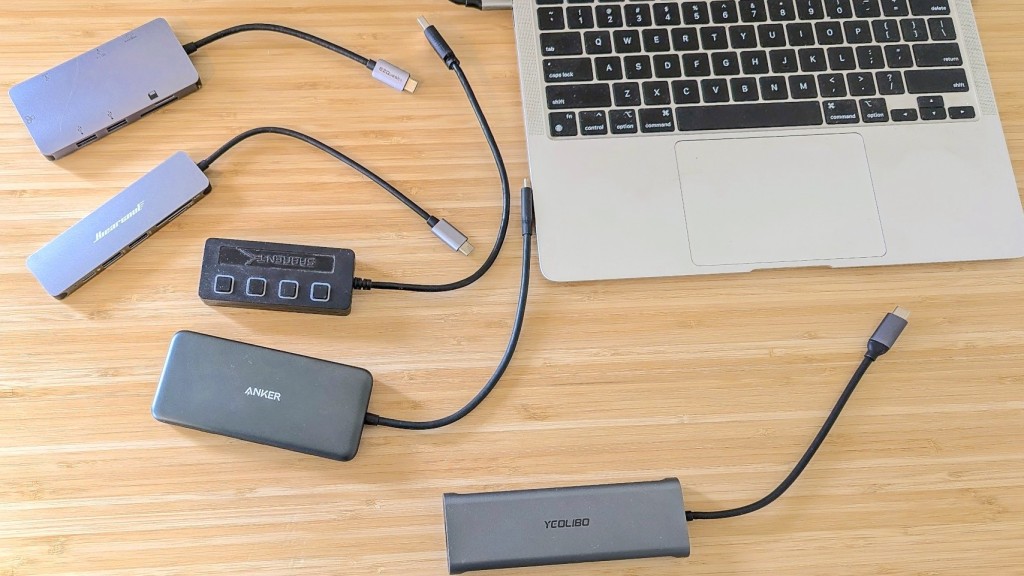
Best USB hubs have become essential for power users who need more ports, faster charging, and seamless connectivity. Whether you’re using a laptop, MacBook, tablet, or desktop, the best USB hubs let you connect multiple devices—like external drives, monitors, keyboards, and phones through a single hub. With advancements like USB-C Power Delivery, Thunderbolt 4, and ultra-fast data transfer, today’s hubs are smarter, faster, and more reliable than ever. This guide will help you find the perfect USB hub for your needs whether for work, gaming, or travel.
This guide helps you choose the best USB hub tailored for performance, connectivity, and charging, making life easier whether you’re on the go or building a full workstation.
What Is a USB Hub?
- USB Hub: A device that expands one USB port into several. Ideal for connecting multiple peripherals with a single connection.
- Powered vs. Unpowered Hubs:
- Unpowered hubs draw power from the host device—great for low-power accessories.
- Powered (self-powered) hubs include an external power source to handle high-power devices.
- USB‑A vs. USB‑C vs. Thunderbolt:
- USB‑A is older and common on many accessories.
- USB‑C is faster, reversible, and supports charging and video.
- Thunderbolt 4 (via USB‑C) supports up to 40 Gbps and enables daisy-chaining and high-res video.
- Use Cases:
- Laptops/tablets—adding ports for work or play.
- Desktop setups—easily manage keyboards, drives, displays.
- Gaming rigs—quickly connect controllers, headsets, storage.
How a USB Hub Works
A USB hub expands a single USB port on your computer into multiple ports, allowing you to connect several devices simultaneously. It works by receiving data and power from the computer through the main USB connection and distributing them to the connected devices, such as keyboards, mice, external drives, or smartphones. Some hubs are powered, meaning they have their own external power source to support high-energy devices, while bus-powered hubs rely solely on the computer’s USB port. This makes USB hubs a convenient solution for managing multiple peripherals efficiently.
Key Features of the Best USB Hub
- Port Variety
Look for USB‑A, USB‑C, HDMI, Ethernet, and card readers to cover all bases. - Fast Charging (USB-C Power Delivery)
Supports charging laptops and phones. Ideally 100 W or more. - Speed Performance
- USB 3.2 Gen 1: up to 5 Gbps
- USB 3.2 Gen 2: 10 Gbps
- Thunderbolt 4: 40 Gbps
- Build and Portability
Durable metal shells for desktop use, and compact designs for travel. - Compatibility
Works across Windows, macOS, Linux, iPadOS, Android. - Power Delivery & Passthrough Charging
Some hubs let you power your device while using the hub—key for sleek, single‑cable setups.
Best USB Hubs (Top Picks)

Most port variety + 90 W PD
Dell 7-in-1 USB-C Multiport Adapter – DA310
₱6,990.00
ELN Online Store – Philippines

Compact travel hub with HDMI & charging
Ugreen 6‑in‑1 USB‑C Adapter with 4K HDMI
₱1,149.00
Shopee + others
★★
4.8
Ask about this
ChatGPT chooses products independently. Learn more
Highlights:
- Dell 7-in-1 USB-C Multiport Adapter – DA310
Offers USB‑A, USB‑C, HDMI, VGA, Ethernet, plus 90 W pass-through charging. Perfect for travelers or mixed-device users. - Ugreen 6‑in‑1 USB‑C Adapter with 4K HDMI
Slim and affordable. Includes HDMI output, USB‑C PD input, and USB‑A ports—great for lightweight travel setups.
Also worth noting:
- Wired USB-C 9-in-1 Hub (Plugable) offers 140 W PD, full metal build, 4K 60Hz HDMI, and fast data speeds. A powerhouse for MacBook Pros and heavy users.
USB Hub vs. USB Docking Station
| Feature | USB Hub | Docking Station |
|---|---|---|
| Charging Power | Limited (via host, or PD pass-through) | Robust (external power, can charge laptop) |
| Port Types | Mostly USB, occasionally HDMI | Wider range—HDMI, Ethernet, SD, audio |
| Data Speeds | Up to 10 Gbps | Up to 40 Gbps (Thunderbolt 4) |
| Portability | Compact and lightweight | Larger and designed for desk use |
| Price | Budget-friendly | Higher cost, but more functionality |
Use a hub for lighter, mobile needs. Choose a dock if you want a full desktop experience with monitors and power.
Fast Charging with USB Hubs
Many modern USB hubs support fast charging, allowing you to quickly power devices like smartphones, tablets, and other peripherals while connected. Hubs with dedicated power delivery (PD) ports can provide higher wattage, ensuring efficient charging without slowing down data transfers. Choosing a hub with fast-charging capabilities is especially useful for users with multiple devices, as it combines convenience, speed, and functionality in a single, compact solution.
Compatibility Tips
- Laptops need at least USB-C PD passthrough or Thunderbolt for full function.
- Tablets/phones—USB OTG support matters.
- Gaming gear—ensure hub can handle input lag and power needs.
- Older devices—USB 2.0/3.0 still work on newer hubs, though at lower speeds.
Safety & Durability
When choosing a USB hub, safety and durability are key factors to consider. High-quality hubs feature overcurrent and overvoltage protection to prevent damage to connected devices, while sturdy materials and reinforced ports ensure the hub can withstand daily use. Durable designs not only extend the lifespan of the hub but also provide reliable performance for frequent data transfers and charging, giving you peace of mind when connecting multiple devices at once.
Future Trends in USB Hubs
- USB 4.0 and Thunderbolt 5 bringing even faster speeds and smarter power management.
- Magnetic modular hubs you can snap away for different setups.
- Wireless charging built-in—add a power pad on your hub.
- AI-powered smart hubs that manage energy and prioritize devices based on use.
Conclusion
Choosing the right USB hub can greatly improve your productivity by expanding connectivity for multiple devices. Whether you need extra USB ports for data transfer, charging, or connecting peripherals, selecting a hub with the right number of ports, speed (USB 3.0/3.1), and compatibility ensures seamless performance. Investing in a quality USB hub helps simplify your workspace and keeps all your devices connected efficiently.
FAQs
1. Can a USB hub damage my device?
Not if it’s certified and built properly. Stick with reputable brands.
2. What’s the difference between USB 3.2 and USB 4.0?
USB 3.2 supports up to 20 Gbps. USB 4 (and Thunderbolt) go up to 40 Gbps, handle video, and support daisy-chaining.
3. Can a USB hub charge my laptop?
Only hubs with USB-C PD passthrough. Even then, power may shift to connected devices, reducing efficiency.
4. Are all USB-C hubs compatible with MacBooks?
Most are, but double-check PD level and video support specs.
5. Do USB hubs slow down data transfer?
They share the host’s bandwidth more devices can mean lower speed. Use powered or faster hubs for heavy use.
6. Can I use a USB hub with gaming consoles?
Absolutely. Many USB hubs work with PlayStation, Xbox, and Nintendo Switch for connecting controllers, headsets, or external drives just ensure compatibility with the console’s USB version.
7. How many devices can I safely connect to a USB hub?
It depends on the hub’s power output. For high-powered devices, use a powered USB hub to avoid performance or stability issues. Unpowered hubs are best for mice, keyboards, and USB flash drives.
8. What are the downsides of USB hubs?
USB hubs can sometimes reduce data transfer speeds if multiple high-bandwidth devices are connected simultaneously. Bus-powered hubs may not provide enough power for energy-hungry devices, and lower-quality hubs can overheat or fail over time.
9. Is USB 3.0 or 3.2 better?
USB 3.2 is better than USB 3.0 as it offers faster data transfer rates and improved power delivery. However, your devices and cables must also support USB 3.2 to take full advantage of the speed.
10. Are Ugreen USB hubs good?
Yes, Ugreen USB hubs are well-regarded for their build quality, reliable performance, and affordability. They offer a range of options, including hubs with fast-charging ports and multiple USB 3.0/3.2 ports suitable for most setups.
Disclaimer
This guide provides general insights. Features, prices, and availability may vary. Always confirm with manufacturers before purchase.

