

A data centers is a facility — typically a large building or a set of rooms — that houses a collection of computer servers, storage systems, network gear, and supporting infrastructure. It is where the data behind websites, cloud services, apps, and corporate systems lives, gets processed, and gets stored.
Think of it as a “digital warehouse,” but instead of storing boxes or goods, it stores data.
Why data centers matter in today’s digital world
Our daily life — from sending emails, browsing social media, streaming music or movies, to banking, shopping online, and using cloud apps — relies on data centers working behind the scenes. Without them:
- Cloud services and online apps would slow down or not work at all
- Businesses couldn’t store or backup their data reliably
- Global connectivity, remote work, streaming, and real-time services wouldn’t be possible
As more parts of our life move online, data centers become the backbone of the digital economy.
Brief history and evolution of data centers
- In the early days, small server rooms at companies handled data processing and storage.
- As computing needs grew (enterprise software, internet, databases), specialized facilities were built.
- With the rise of the internet and cloud computing, large-scale data centers emerged.
- Now, with AI, big data, IoT (Internet of Things), and mobile usage surging — data centers have become massive, high-tech operations consuming big power and storage.
Why do you need a data center?
A data center is essential for businesses and organizations that rely on digital information. It provides secure, reliable, and high-speed storage and processing for websites, applications, cloud services, and enterprise systems. Using a data center ensures that data is backed up, protected, and accessible at all times, even during power outages or hardware failures. For companies with large volumes of traffic or sensitive information, data centers help maintain performance, security, and business continuity, making them a critical part of modern IT infrastructure.
How a Data Center Works
A data center is a facility that stores, processes, and manages large amounts of digital information. It uses servers, storage devices, and networking equipment to handle data requests from users and devices. When you send or access data, servers process it, store it securely, and transmit it back through high-speed networks, often using fiber optic cables for fast and reliable delivery. Data centers also include cooling systems, power backups, and security measures to ensure uninterrupted operation. This combination of hardware, software, and infrastructure allows businesses, websites, and cloud services to operate efficiently and securely.
Key roles in maintaining uptime and reliability
- Power supply (backup systems, UPS, generators) ensures data centers stay online even during blackouts.
- Cooling & HVAC systems manage temperature and humidity to avoid overheating.
- Redundant systems (multiple power lines, backup servers, failover mechanisms) keep service available during failures or maintenance.
- Monitoring & maintenance teams — 24/7 — to handle hardware failures, network issues, or security events.
Core Components of a Data Center
Let’s break down the essential parts you’ll find in a typical data center.
Servers & Storage Systems
Servers — high-performance computers — are the heart of the data center. They run applications, process requests, and handle workloads. Storage systems (HDDs, SSDs, SANs, NAS) store vast amounts of data: user files, databases, backups, logs, etc.
Networking Equipment (Switches, Routers, Firewalls)
- Switches — connect servers within the data center for internal data movement.
- Routers — connect the data center to the Internet and other networks.
- Firewalls & security appliances — protect data from unauthorized access, cyberattacks, and manage traffic flow.
Power Systems (UPS, Generators)
Power is critical. Data centers typically use Uninterruptible Power Supplies (UPS) to bridge short-term outages and backup generators for extended outages. Many large data centers also have redundant power feeds to avoid single points of failure.
Cooling Systems & HVAC
Servers produce a lot of heat. Without cooling, equipment can overheat and fail. Cooling systems (air conditioning, liquid cooling, HVAC) keep the environment inside safe and stable.
Racks, Cables & Physical Infrastructure
Servers and storage devices are mounted on racks. Structured cabling connects all devices. Physical infrastructure also includes raised floors, cable trays, fire suppression, access control, and environmental controls (humidity, dust, etc.).
Types of Data Centers
Not all data centers are built the same. Here are common types:
- Enterprise data centers — Owned and operated by a single company, usually on-premises.
- Colocation data centers — A third‑party facility where multiple companies rent space, power, and connectivity.
- Cloud data centers — Operated by cloud service providers, delivering infrastructure to many clients over the Internet.
- Edge data centers — Smaller data centers located closer to end‑users (e.g. at the edge of a network), reducing latency.
- Hyperscale data centers — Very large, high‑capacity centers built to support massive cloud workloads, AI, and global services.
According to recent market data, hyperscale centers dominate a large share of growth.
Data Center Tiers and Standards
To guarantee performance and reliability, data centers are often classified into tiers. The most common standard comes from Uptime Institute — Tiers I to IV.
| Tier | Description / Uptime | Typical Use Case |
|---|---|---|
| Tier I | Basic capacity, single path for power and cooling, no redundancy | Small business or non-critical workloads |
| Tier II | Some redundancy (e.g. UPS, backup components), but limited fault tolerance | Mid-size companies needing reasonable reliability |
| Tier III | Concurrent maintainability: can perform maintenance without downtime; redundant power & cooling paths | Enterprise workloads, colocation, cloud services |
| Tier IV | Fault-tolerant: fully redundant, multiple active paths; highest uptime guarantee | Critical systems, financial, healthcare, large-scale cloud / hyperscale |
“Uptime guarantees” refer to the percentage of time a data center is expected to be available annually. For example, Tier III may guarantee ~99.982% uptime; Tier IV can aim even higher.
Additionally, standards from organizations such as ANSI/TIA (Telecommunications Infrastructure Standard) help ensure proper cabling, infrastructure design, and consistency across data centers.
Key Concepts Every Beginner Should Know
Some important technical and operational concepts that frequently come up:
Redundancy (N, N+1, 2N, 2N+1)
Redundancy refers to backup capacity. For example:
- N means the necessary capacity to run the facility (just enough).
- N+1 means one extra unit — if one fails, backups can handle the load.
- 2N means duplicated capacity (double).
- 2N+1 means double capacity + extra — strong fault tolerance.
Virtualization
Virtualization allows one physical server to run multiple “virtual servers” (virtual machines). This increases utilization and flexibility — important for cloud and enterprise data centers.
Scalability
As demand grows, data centers must scale: add more servers, storage, network, power, cooling. Scalability ensures a data center can expand without hurting performance or reliability.
Load balancing
Load balancing spreads traffic or processing across several servers or systems. It prevents overload, improves performance, and ensures reliability.
Disaster recovery & failover
Disaster recovery plans help restore data and service in case of major failures (power outage, hardware failure, disasters). Failover mechanisms automatically switch to backup systems to minimize downtime.
Physical vs. Cloud Data Centers
How traditional facilities compare to cloud providers
- Physical / On‑Premises (Enterprise): The company owns and operates infrastructure in its own location. They have full control, but also full responsibility (maintenance, power, cooling). Good for sensitive data, regulatory compliance, custom hardware, or legacy systems.
- Cloud Data Centers: Infrastructure owned and managed by cloud providers. Users rent or subscribe. Cloud offers flexibility, scalability, cost‑efficiency, and less overhead for customers.
On‑premises vs. off‑premises hosting
- On-premises hosting: good for strict data sovereignty, compliance, controlled environments.
- Off-premises / Cloud / Colocation: cheaper on initial cost, more flexible, less maintenance burden, easier to scale.
Benefits and drawbacks of each model
| Model | Benefits | Drawbacks |
|---|---|---|
| On‑premises | Full control; high security; compliance; customized setup | High upfront cost; maintenance burden; scalability limited by resources |
| Cloud / Colocation / Off‑premises | Lower cost initially; easy to scale; managed by experts; flexibility | Less control; data privacy concerns; recurring costs; possible latency for global reach |
Security in Data Centers
Given the critical role data centers play, security is vital on multiple levels.
Physical security
Measures include secure access control (keycards, biometric locks), surveillance cameras, guards, layered barriers, and secure zones. Only authorized personnel are allowed inside server rooms.
Network security
Firewalls, intrusion detection systems (IDS), encryption, secure VPNs — all help protect data traveling in and out of the data center from hackers, DDoS attacks, and unauthorized access.
Cybersecurity best practices
- Regular software updates and patch management
- Data encryption at rest and in transit
- Monitoring and logging for suspicious activity
- Role-based access control for administrators
- Regular audits and penetration testing
Compliance considerations
Many industries (e.g. finance, healthcare) require data centers to meet compliance standards (data protection, data residency, privacy laws). Meeting compliance often involves certifications and strict security procedures.
Trends Shaping the Future of Data Centers
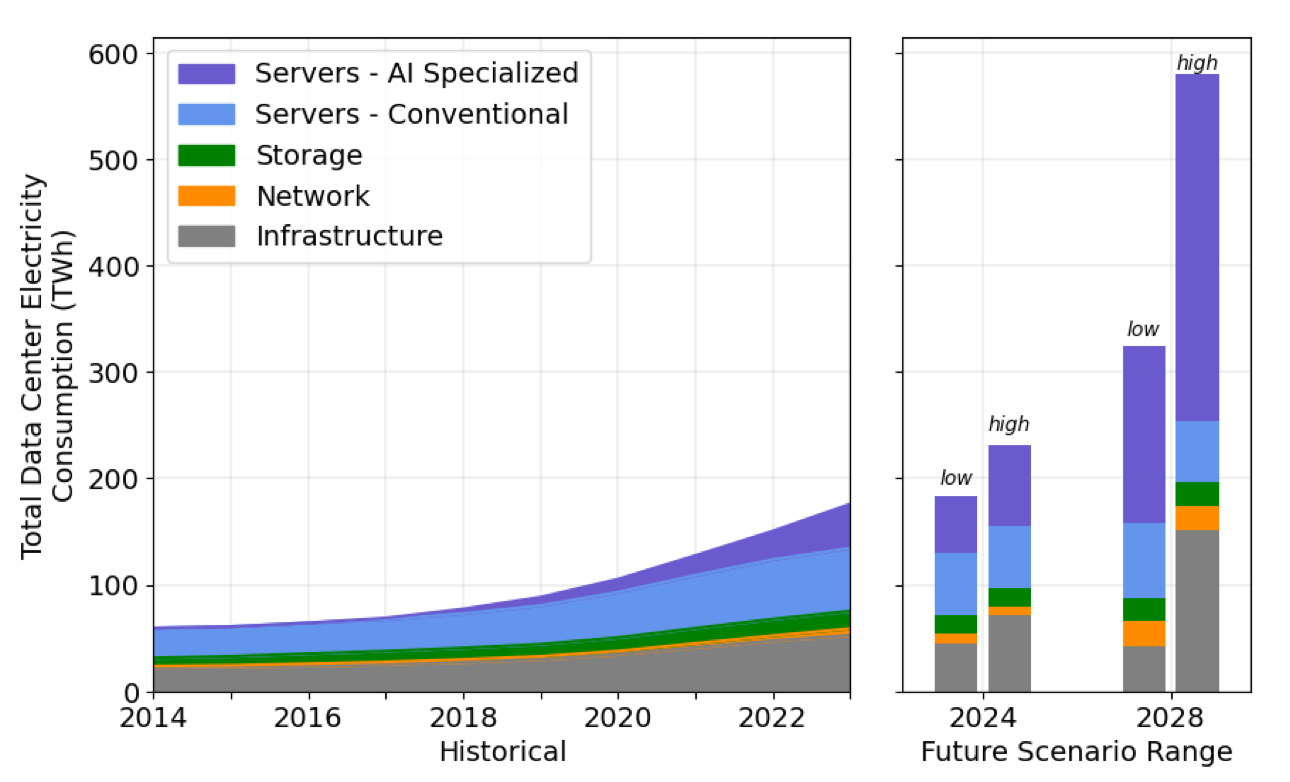
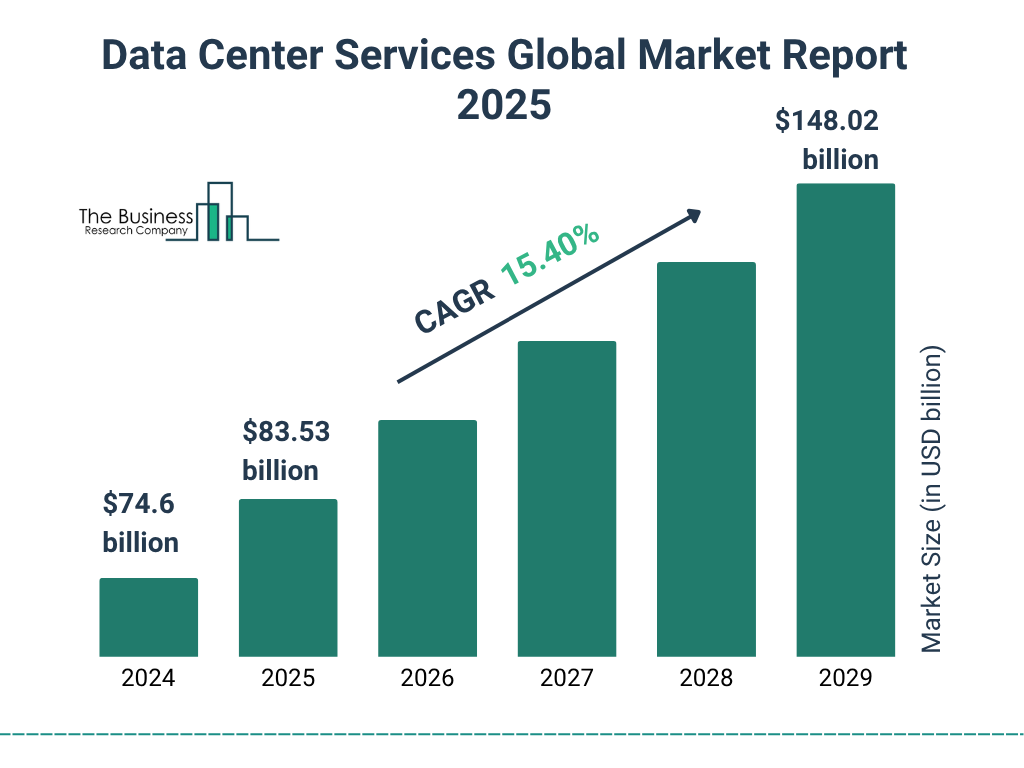

4
AI and automation
With the rise of AI workloads, data centers are becoming more powerful and specialized — capable of processing massive amounts of data, training models, running inference. Automation tools help manage load balancing, cooling, energy use, and resource allocation dynamically.
Renewable energy and green data centers
As data center power needs increase, many operators adopt renewable energy (solar, wind), energy‑efficient hardware, and green practices. This helps reduce carbon footprint and operating costs.
Liquid cooling systems
Traditional air cooling sometimes isn’t enough for high-density servers and AI hardware. Liquid cooling — using water or special coolants — is rising as a more efficient way to manage heat and energy consumption.
The rise of edge computing
Smaller, distributed data centers (edge centers) located closer to users help reduce latency and support real-time applications (IoT, streaming, gaming, AR/VR). As mobile usage and IoT devices grow, edge data centers are becoming more common.
Given global market projections — from about USD 266.5 billion in 2025 to over USD 700 billion by 2035, with strong growth in hyperscale and edge data centers — it’s clear the industry shows no signs of slowing down.
How to Choose a Data Center (for your business or project)
If you need to pick a data center — either building your own or choosing a provider — consider these factors:
Location factors
- Proximity to users (latency)
- Risk of natural disasters (floods, earthquakes)
- Power and water availability (for cooling)
- Regulatory and compliance environment
Reliability and uptime
Check the data center’s tier level, redundancy (power, cooling, network), and track record for uptime.
Service-level agreements (SLAs)
SLAs define uptime guarantees, support response times, maintenance windows, security measures, and liability. Always review them carefully.
Cost and scalability
Consider upfront costs (if building or leasing), recurring costs (power, cooling, maintenance), and flexibility to scale up as your needs grow.
Security and certifications
Ensure the data center follows physical and network security best practices, and meets any compliance or certification requirements your project demands.
Benefits of data centers
Modern data centers provide businesses with fast, reliable, and secure data management. They offer high-speed performance for processing large volumes of data and allow easy scaling as your needs grow. With advanced security measures, backup power, and disaster recovery systems, they ensure uninterrupted operations and protect sensitive information. Centralized management also reduces operational costs, while efficient cooling and energy practices make them more environmentally friendly. Additionally, modern data centers support cloud computing and virtual services, enabling businesses to operate smoothly and globally.
Final Thoughts
Understanding the fundamentals of how data centers work — their infrastructure, types, standards, and trends — helps us appreciate the complex systems that keep the digital world running. Data centers are more than just rows of servers: they are critical infrastructure powering everything from cloud storage to AI. Whether you are a small business evaluating hosting options, or planning a large-scale cloud deployment, knowing what’s behind the “cloud” helps you make smarter, safer, and more sustainable choices.
Why This Matters to You
- You rely on data centers every time you stream a video, use a cloud app, shop online, or send an email.
- As more technologies — AI, IoT, edge computing — grow, data centers will be more central to everyday tech.
- Picking the right data center (or provider) can affect performance, cost, latency, data‑safety, and scalability.
FAQs
- What is the difference between a cloud data center and a colocation center?
- A cloud data center is owned and operated by a cloud provider and serves many clients over the internet. A colocation center is a facility where multiple customers rent space, power, and connectivity but manage their own servers.
- What does “Tier III data center” mean?
- Tier III means the data center has redundant power and cooling, and can undergo maintenance without shutting down operations — offering high reliability suitable for enterprise or cloud workloads.
- Why is cooling so important in a data center?
- Servers generate a lot of heat. Without proper cooling (via HVAC, liquid cooling, etc.), hardware can overheat, degrade faster, or fail — leading to data loss, downtime, or damage.
- What is redundancy and why does it matter?
- Redundancy means having backup systems (for power, networking, hardware). It matters because if a component fails (power outage, hardware failure), the backup ensures the data center stays online — minimizing downtime.
- What are edge data centers used for?
- Edge data centers are small facilities closer to users. They reduce latency and are ideal for real-time applications: streaming, gaming, IoT, mobile services, or any app requiring quick response.
- On‑premises data center vs. cloud — which is better?
- There’s no one‑size‑fits‑all answer. On‑premises gives you full control and is good for security/compliance; cloud offers flexibility, scalability, and lower maintenance. Choose based on needs, budget, and goals.
- How do data centers stay secure physically and digitally?
- Physical security uses access control (locks, biometrics), surveillance, and secure zones. Digital security involves firewalls, encryption, monitoring, access control, and regular audits.
- What is virtualization and why is it important?
- Virtualization lets a physical server host multiple “virtual machines.” It improves hardware utilization and flexibility, and is a foundation for cloud computing and efficient resource use.
- What are the latest trends in data centers?
- Growing use of AI and automation, adoption of renewable energy and green practices, rise of liquid cooling for high‑density hardware, and expansion of edge computing to reduce latency.
- How can businesses choose the right data center for their needs?
- Consider location (latency, natural risks), uptime/reliability (tier, redundancy), cost and scalability, service‑level agreements (SLAs), and security/compliance requirements.
Disclaimer
This article is for educational and informational purposes only. While I aimed to describe data center fundamentals clearly and accurately, the content should not be taken as professional advice or as a technical blueprint for building or operating a data center. Always consult qualified engineers, data center operators, or experts before making decisions related to infrastructure, security, compliance, or large-scale deployments.

