

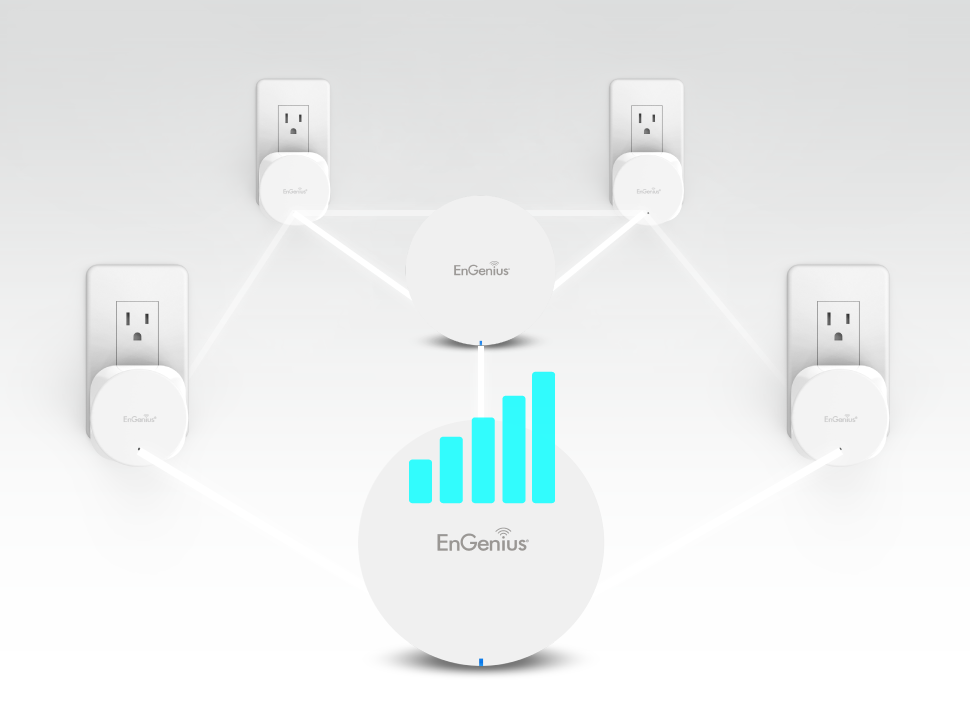
In today’s homes filled with smartphones, smart TVs, voice assistants, and work‑from‑home setups, mesh WiFi has become a game‑changer. Mesh systems use multiple access points to spread your internet evenly across every room. That means no more dead zones, fewer dropped video calls, and seamless streaming in every corner.
You might wonder: “When should I use a mesh WiFi system?” If your single router struggles to reach upstairs bedrooms, outdoor spaces, or thick-walled rooms, a mesh setup is likely your solution.
What Is Mesh WiFi?
Definition: Mesh WiFi is a network made up of a main router and one or more nodes (also called satellites) that work together to blanket your home in WiFi.
Difference from traditional routers and extenders:
- A single router might leave weak spots, especially in larger or multi-story homes.
- WiFi extenders simply repeat your signal and often create separate networks—causing annoying drops when you move around.
- Mesh WiFi sends one single network (SSID) and automatically connects your device to the strongest node—no extra steps required.
Key components:
- Primary router: Connects to your modem.
- Satellite nodes: Extend coverage.
- Often managed via mobile app for easy control.
Core benefits:
- Eliminates dead zones.
- Enables seamless roaming (no need to switch networks).
- Scalable—just add more nodes as needed.
- Self-healing—if one node fails, traffic reroutes automatically.
Who needs Mesh WiFi?
Mesh WiFi is ideal for households or offices with large areas, multiple floors, or thick walls that cause WiFi dead zones. It’s perfect for users with many connected devices, such as smartphones, laptops, smart TVs, and IoT gadgets, who need consistent speeds throughout the space. Mesh systems also benefit those who stream 4K video, play online games, or hold frequent video calls, as they provide seamless connectivity and automatic switching to the strongest node. In short, anyone who struggles with weak WiFi signals in certain parts of their home or office can greatly benefit from a mesh WiFi setup.
How Mesh WiFi Work
Mesh WiFi works by using multiple interconnected nodes to create a single, seamless wireless network that covers your entire home or office. One node connects to your modem and acts as the main router, while additional nodes are placed throughout the space to extend coverage and eliminate dead zones. Unlike traditional WiFi extenders, mesh systems automatically manage traffic and choose the best path for data, ensuring devices stay connected to the strongest signal as you move around. Mesh WiFi networks are easy to manage through mobile apps, often include built-in security features, and provide consistent, high-speed internet for multiple devices across large or multi-story spaces.
Mesh WiFi network setup: Simple—plug in the router, place the nodes, and follow the app’s guidance.
Pros and Cons of Mesh WiFi Systems
Pros
- Whole-home coverage—no more buffer zones.
- Smartphone app control—easy to monitor devices and prioritize traffic.
- Scalability—just add nodes when needed.
- Handles many devices well, especially with QoS and MU‑MIMO support.
Cons
- Higher cost than a single router.
- Possible speed drop with wireless backhaul best avoided if you can use wired backhaul.
- Might need some planning for node placement and setup.
Best Mesh WiFi Setups by Home Size and Need
Small to Medium Homes (Under 2,000 sq ft)
- Recommended systems: TP‑Link Deco, Google Nest WiFi.
- Nodes needed: Usually 2.
- Budget-friendly and easy to scale.
Large Homes (2,000–4,000+ sq ft)
- Recommended systems: Eero Pro 6, Netgear Orbi.
- Wired backhaul is a strong boost.
- Place nodes thoughtfully—for example, on each floor or in opposite corners for best coverage.
Multi-Story or Complex Layouts
- Use a heatmap tool (like NetSpot) to find weak spots and place nodes strategically.
- Mesh WiFi cuts through walls and floors—especially helpful in homes with thick concrete or brick.
Smart Homes with Many Devices
- Choose mesh systems with features like QoS, MU‑MIMO, band steering, or WiFi 6/6E/7.
- Great for streaming, gaming, and smart-device-heavy households.
Tips for Optimizing Your Mesh WiFi Setup
To get the best performance from your mesh WiFi system, place the main node near your modem in a central, open location to maximize signal distribution. Position additional nodes evenly throughout your space, avoiding walls, metal objects, or appliances that can block signals. Use the mesh system’s app or interface to monitor coverage, adjust node placement, and manage connected devices. Ensure your nodes are running the latest firmware for optimal performance and security. Additionally, separate high-bandwidth activities across devices and, if possible, use 5 GHz for speed and 2.4 GHz for range. These tips help maintain fast, reliable, and seamless WiFi across your entire home or office.
Common Mistakes to Avoid
- Nodes too close or too far—either wastes coverage or weakens backhaul.
- Mixing brands/incompatible systems—stick with one ecosystem.
- ISP limits—your mesh can’t fix poor internet speed from your provider.
- Relying only on wireless backhaul in large or thick-wall homes—it may slow performance.
Is Mesh WiFi Right for You?
Mesh WiFi is ideal for homes or offices with large areas, multiple floors, or persistent dead zones where traditional routers struggle to provide consistent coverage. It works best if you have many devices connected simultaneously, such as smartphones, laptops, smart TVs, and IoT gadgets. Mesh systems offer seamless roaming, meaning devices automatically connect to the strongest node without interruption, which is great for streaming, gaming, or video calls. However, for smaller spaces with limited devices, a high-quality single router may be sufficient and more cost-effective. Choosing mesh WiFi depends on your coverage needs, device load, and desire for reliable, whole-home connectivity.
Alternatives:
- Range extenders—cheaper, but often create disjointed networks and poorer performance.
- Powerline adapters—use your home’s wiring, but may face speed limitations.
- Upgrade to a powerful single router—if your home is compact and open plan, this might suffice.
Conclusion
Mesh WiFi systems offer a smarter way to cover your home with fast, reliable internet. They eliminate dead zones, support many devices, and offer seamless roaming all managed effortlessly through mobile apps.
Before you upgrade, think about your home’s layout, the number of users, and where internet speeds struggle. Start small (2–3 nodes) and scale as needed. Your future self will thank you for smoother video calls, lag‑free gaming, and seamless streaming everywhere.
FAQs About Mesh WiFi
1. What’s the difference between mesh WiFi and extenders?
Mesh uses multiple connected nodes under one network for seamless coverage. Extenders simply repeat signal and often create separate networks, causing hiccups when moving around.
2. Can I use my old router with a mesh system?
Some systems can be paired with existing routers, but performance and compatibility are best when fully integrated in a mesh setup.
3. How many mesh nodes do I need?
Depends on your home. Small homes may need just two, while larger or complex homes could benefit from three or more.
4. Is mesh WiFi good for gaming?
Yes, especially if you use wired backhaul, QoS, and modern standards. Mesh provides low latency and stable speeds.
5. Does mesh WiFi replace my modem?
No. Mesh systems work with your modem. The main router connects to your modem, while nodes spread the signal around.
6. Do Mesh WiFi systems work with any ISP?
Yes! Mesh systems replace your existing router and connect directly to your ISP-provided modem (or modem/router combo, with WiFi disabled).
7. How many mesh nodes do I need?
- Small Homes (<2,000 sq ft): 1 router + 1 node
- Medium Homes (2,000–3,500 sq ft): 1 router + 2 nodes
- Large Homes (3,500+ sq ft): 1 router + 3+ nodes
8. What does a WiFi mesh do?
A WiFi mesh system uses multiple interconnected nodes to create a single, seamless network that extends WiFi coverage across your home or office. It eliminates dead zones and ensures devices automatically connect to the strongest signal for stable internet access.
9. Is mesh WiFi better than a router?
Mesh WiFi is better than a traditional single router for large spaces, multi-story homes, or areas with WiFi dead zones, as it provides consistent coverage and seamless roaming. For smaller homes with few devices, a high-quality router may be sufficient.
10. How far can mesh WiFi reach?
The range of a mesh WiFi system depends on the number of nodes and building layout. Typically, each node covers 1,500–2,500 square feet, and adding more nodes increases coverage without sacrificing performance.
11. What is the difference between mesh WiFi and normal WiFi?
Normal WiFi relies on a single router to broadcast a signal, which may struggle in large or obstructed spaces. Mesh WiFi uses multiple nodes working together to provide consistent coverage, better speeds throughout the area, and automatic device handoff between nodes.
Disclaimer
This content is for general informational purposes only. Mesh WiFi products and performance can vary based on your specific setup, internet plan, and environment. Always check manufacturer specs and conduct your own testing for optimal results.


Equilibrado de piezas
El equilibrado representa una fase clave en el mantenimiento de maquinaria agricola, asi como en la fabricacion de ejes, volantes, rotores y armaduras de motores electricos. El desequilibrio genera vibraciones que aceleran el desgaste de los rodamientos, provocan sobrecalentamiento e incluso llegan a causar la rotura de componentes. Para evitar fallos mecanicos, resulta esencial detectar y corregir el desequilibrio a tiempo utilizando metodos modernos de diagnostico.
Metodos principales de equilibrado
Hay diferentes tecnicas para corregir el desequilibrio, dependiendo del tipo de pieza y la intensidad de las vibraciones:
El equilibrado dinamico – Se utiliza en componentes rotativos (rotores, ejes) y se realiza en maquinas equilibradoras especializadas.
Equilibrado estatico – Se usa en volantes, ruedas y otras piezas donde basta con compensar el peso en un solo plano.
La correccion del desequilibrio – Se lleva a cabo mediante:
Perforado (eliminacion de material en la zona mas pesada),
Colocacion de contrapesos (en ruedas, aros de volantes),
Ajuste de masas de balanceo (como en el caso de los ciguenales).
Diagnostico del desequilibrio: equipos utilizados
Para detectar con precision las vibraciones y el desequilibrio, se utilizan:
Maquinas equilibradoras – Miden el nivel de vibracion y definen con precision los puntos de correccion.
Analizadores de vibraciones – Capturan el espectro de oscilaciones, identificando no solo el desequilibrio, sino tambien fallos adicionales (como el desgaste de rodamientos).
Sistemas laser – Se usan para mediciones de alta precision en componentes criticos.
Especial atencion merecen las velocidades criticas de rotacion – regimenes en los que la vibracion aumenta drasticamente debido a la resonancia. Un equilibrado correcto previene danos en el equipo en estas condiciones de funcionamiento.