

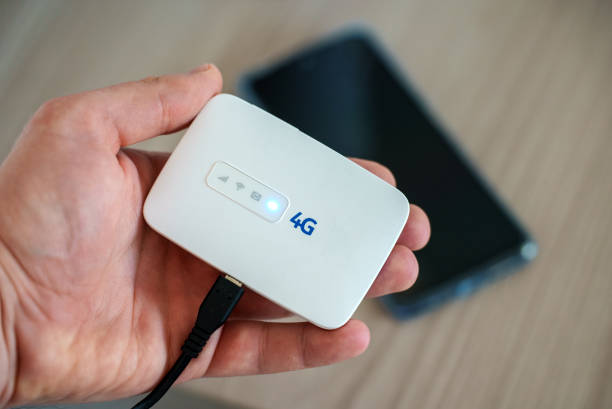
Pocket WiFi is a small, portable device that gives you internet almost anywhere. In today’s fast-paced 2025 world, where being connected on the go is more important than ever, it’s a lifesaver, whether you’re traveling, working remotely, or studying online.
This guide will compare the top pocket WiFi devices of 2025, walk you through choosing the best one, and offer expert tips, FAQs, and even visual charts to help you decide.
What Is Pocket WiFi?
Pocket WiFi is a compact hotspot that uses cellular networks (4G, LTE, or 5G) to share internet via WiFi. You carry it in your bag, turn it on, and connect your devices, simple as that.
How Does Pocket Wi‑Fi Work?
A pocket Wi‑Fi device connects to a mobile cellular network (3G, 4G, or 5G) and turns that signal into a personal Wi‑Fi hotspot. You can then connect multiple devices like smartphones, laptops, or tablets to the hotspot, giving them internet access wherever there’s mobile coverage. It’s portable, easy to use, and ideal for travel, remote work, or areas without fixed broadband.
Key Features & Benefits
- Super portable
- Connect multiple devices at once
- Stronger battery life than smartphone hotspots
- Often includes security features like VPN and password protection
Who Needs It?
- Travelers who want easy internet abroad
- Remote workers needing reliable connection offsite
- Students studying or streaming on the move
How to Choose the Best Pocket WiFi in 2025
Here’s what to look for when picking a device:
- Battery Life: Aim for 10+ hours for long use.
- Data Speed & Coverage: 5G is fastest; but 4G ≥ 150 Mbps is still good.
- Device Compatibility: How many users need to connect?
- SIM vs eSIM: SIM gives flexibility; eSIM is easier if supported.
- Rent vs Buy: Short trip? Renting may save money. Frequent use? Buying is better.
- Security: VPN support and strong settings keep you safe online.
Top Pocket WiFi Devices: Full Comparison
When comparing the top pocket Wi‑Fi devices, key factors like speed, network compatibility, battery life, coverage, and price help determine the best choice for your needs. Leading models offer 5G connectivity for fast download and upload speeds, support multiple simultaneous connections, and provide long‑lasting battery life for all‑day use. Some devices include useful extras like security features, companion apps, and global roaming support, while budget‑friendly options focus on solid performance and simplicity. By evaluating these features alongside your travel habits or daily data needs, you can find a pocket Wi‑Fi device that offers the best balance of power, portability, and value.
Comparison Table
| Device | Network | Max Devices | Battery | Highlight |
|---|---|---|---|---|
| Netgear Nighthawk M6 Pro | 5G + WiFi 6E | 32 | 13 h | Top speeds, many devices |
| GlocalMe G4 Pro | 4G global | 10 | 12 h | SIM‑free, global use |
| TP‑Link M7650 | 4G LTE | 32 | 15 h | Affordable, long battery |
| Huawei 5G WiFi Pro 2 | 5G | ~10–20 | 6400 mAh | High speed, reverse charging |
| GlocalMe Numen Air 5G | 5G/4G | 10 | 3500 mAh | Lightweight, cloud‑SIM tech |
Pocket WiFi vs Alternatives
Pocket WiFi vs Smartphone Hotspot
- Pocket WiFi usually has better battery life and supports more devices.
Pocket WiFi vs Local SIM Cards
- SIMs may be cheaper, but pocket WiFi lets many devices connect without swapping cards.
Pocket WiFi vs eSIM
- eSIMs are more convenient if your device supports it, but pocket WiFi delivers better multi-device flexibility.
Best Pocket WiFi Providers by Region
- Australia, USA, Europe: Look to global models like Netgear and Huawei.
- Asia (Philippines): Popular picks include Smart Bro 5G Pocket Pro, ZTE MU5120 (up to 64 devices, fast charging)
- Middle East & Africa: Check coverage maps and opt for unlocked global devices.
Renting vs Buying Pocket WiFi
| Feature / Factor | Renting Pocket Wi‑Fi | Buying Pocket Wi‑Fi |
|---|---|---|
| Upfront Cost | Low — typically a refundable deposit and daily/weekly rate | Higher — full purchase price upfront |
| Long‑Term Cost | Can be expensive over time | More cost‑effective if used regularly |
| Flexibility | Very flexible — ideal for short trips or temporary use | Less flexible — best for frequent or long‑term use |
| Maintenance | Provider handles maintenance and replacements | You are responsible for upkeep and repairs |
| Latest Tech | Easy to get the newest device from rental providers | Depends on how often you upgrade |
| Network Lock | May be locked to specific networks | Often unlocked or supports multiple SIMs |
| Internet Plans | Often bundled with data plans | You choose any plan you want |
| Convenience | Quick setup when traveling | Always available at home or on the go |
| Best For | Travelers, short‑term needs | Daily commuters, long stays, frequent users |
Advantages of Pocket WiFi
Pocket Wi‑Fi offers several advantages that make it a convenient solution for staying connected. It provides portable internet access anywhere with cellular coverage, allowing multiple devices to connect at once. Users benefit from fast speeds on 4G or 5G networks, secure connections compared to public Wi‑Fi, and flexibility for travel or remote work. Pocket Wi‑Fi is easy to set up, eliminates the need for fixed broadband, and often reduces roaming data costs, making it a practical and reliable choice for both personal and professional use.
How to Set Up and Use Pocket WiFi
- Turn it on.
- Find the WiFi name (SSID) and password (usually on the device or in the app).
- Connect from your phone or laptop.
- Position it where the phone signal is strong.
- Charge it during idle periods, turn off when not in use to save power.
Benefits of Using Pocket Wi-Fi
Using a pocket Wi‑Fi offers several advantages for both travelers and everyday users. It provides portable internet access anywhere with cellular coverage, allowing multiple devices to connect simultaneously. Pocket Wi‑Fi is ideal for remote work, streaming, or online gaming on the go without relying on public Wi‑Fi networks. It’s easy to set up, often more secure than free hotspots, and can save costs compared with roaming data plans. Additionally, modern devices support fast 4G and 5G connections, ensuring smooth browsing, video calls, and downloads no matter where you are.
Tips for Using Pocket Wi-Fi Effectively
To get the most out of your pocket Wi‑Fi, place the device in a central location for better signal coverage to all connected devices. Keep it charged or connected to a power source during extended use, and limit the number of devices if speeds drop. Use secure passwords to prevent unauthorized access, and monitor your data usage to avoid overage charges. For the best performance, choose 5G or 4G networks whenever available, and update the device’s firmware regularly to benefit from the latest features and security improvements. Proper care and setup can ensure reliable, fast, and secure internet wherever you go.
Final Verdict: Best Pocket WiFi in 2025
- Best overall: Netgear Nighthawk M6 Pro—fast, long-lasting, multi-device support.
- Best value international: GlocalMe G4 Pro—SIM-free global use.
- Best budget: TP‑Link M7650—solid 4G, long battery, wallet-friendly.
- No signal? Move to clearer area.
- Slow internet? Turn off unused devices, or reset the unit.
Editor’s Pick: If you need future-proof speed and solid battery life, the Netgear Nighthawk M6 Pro is the standout choice.
FAQs About Pocket WiFi
Is pocket WiFi secure?
Yes, devices typically have password protection; choose one with VPN support for extra safety.
Can I use pocket WiFi internationally?
Yes, if the device is unlocked or supports global bands like 5G/4G LTE.
How many devices can connect at once?
Anywhere from 10 to 32 devices, depending on the model.
Is “unlimited” data truly unlimited?
Not always, some plans throttle speed after a certain usage. Always check details.
How many devices can connect to one pocket WiFi?
Most pocket WiFi devices can connect between 5 to 32 devices at once, depending on the model and brand.
Are there any pocket WiFi devices without a SIM card?
Yes, there are pocket WiFi devices that operate without a physical SIM card, many use Cloud SIM or eSIM technology to connect globally without needing a traditional SIM.
Disclaimer
This content is for general informational use only. Speeds, prices, and device availability may change. Always verify with manufacturers or local retailers before purchasing or renting.


Thanks for sharing. I read many of your blog posts, cool, your blog is very good. https://accounts.binance.com/es-MX/register-person?ref=GJY4VW8W