

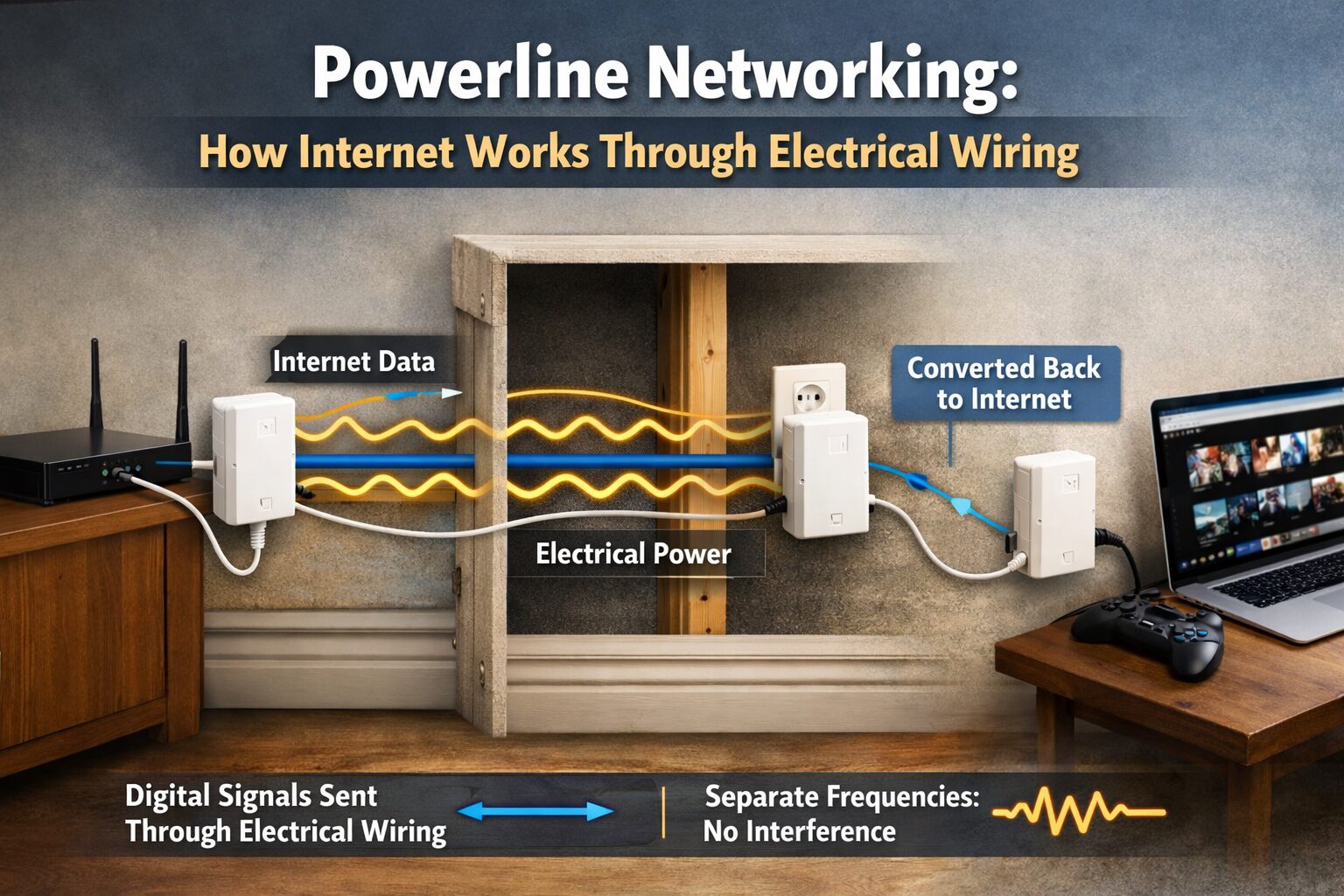
Getting stable internet in every room can be frustrating. Wi‑Fi signals weaken through thick walls, floors, and long distances, while Ethernet cables often require drilling and professional installation. This is where powerline networking becomes a practical alternative. Powerline technology allows internet data to travel through your home’s existing electrical wiring, turning power outlets into network connection points.
Powerline networking is popular among homeowners, gamers, and remote workers who want stable internet without new cables. It bridges the gap between Wi‑Fi convenience and Ethernet reliability using something every home already has—electrical wiring.
What Is Powerline Networking?
Powerline networking is a technology that sends internet data through your home’s electrical circuits. Instead of relying on wireless signals, it uses power outlets to carry network data alongside electricity. With the help of powerline adapters, users can extend internet access to rooms where Wi‑Fi struggles, such as basements, garages, or upper floors. Once plugged in, these adapters create a wired-like connection using your electrical system.
Who needs the Powerline?
Powerline networking is best for people who struggle with weak Wi-Fi signals but don’t want to install Ethernet cables. It’s ideal for large or multi-story homes, home offices, gamers, and streaming users who need a more stable connection in rooms with thick walls or dead zones. It’s also a practical option for renters and smart home users who want reliable internet using existing electrical outlets.
How Powerline Internet Works Through Electrical Wiring
Powerline internet works by converting digital data from your router into electrical signals. These signals travel through the wiring in your walls and are then converted back into internet data by another adapter in a different room. The electricity and data signals operate on different frequencies, so they do not interfere with each other. This allows powerline networking to deliver internet access without affecting normal electrical use.
How does Powerline Work?
Powerline networking works by sending internet data through your home’s electrical wiring. A powerline adapter connected to your router converts internet data into electrical signals and sends them through the power lines. Another adapter plugged into a different outlet receives the signal and converts it back into usable internet for your device. The data and electricity travel on separate frequencies, so they don’t interfere with each other, providing a stable wired-like connection without installing new cables.
How Powerline Technology Works
Powerline technology works by using your home’s existing electrical wiring to transmit internet data. A powerline adapter connected to your router converts digital data into electrical signals and sends them through the power lines. Another adapter plugged into a different outlet receives these signals and turns them back into internet data for your device. The technology uses separate frequencies for power and data, along with built-in encryption, to ensure a stable and secure connection without installing new network cables.
Key Features of Powerline Networking
- Plug-and-Play Setup: Most powerline adapters are easy to install—just plug them into outlets and pair, no technical expertise required.
- Wired-Like Stability: Uses electrical wiring to deliver consistent internet speeds, often more reliable than Wi-Fi in areas with interference.
- Built-In Security Encryption: AES 128-bit encryption protects your network and prevents unauthorized access.
- Compatibility With Home Electrical Systems: Works with standard household wiring and is compatible with most routers and devices.
- Expandable Network: You can add multiple adapters to extend coverage across rooms or floors.
- Optional Wi-Fi Support: Some adapters include Wi-Fi access points for wireless devices, combining wired stability with wireless convenience.
- Energy Efficiency: Uses existing electricity efficiently without adding significant power consumption.
These features make powerline networking a practical solution for extending internet access, improving stability, and securing your home network without running new cables.
How to Set Up the Powerline Network?
Setting up a powerline network is quick and simple. Plug the first powerline adapter into a wall outlet near your router and connect it using an Ethernet cable. Next, plug the second adapter into a wall outlet in the room where you need internet and connect it to your device. Press the pair or sync button on both adapters to secure the connection. Once paired, the adapters use your home’s electrical wiring to deliver a stable internet connection without extra setup.
Benefits of Using Powerline Internet
Powerline internet offers a simple way to get stable connectivity without installing new cables. It uses your existing electrical wiring, making setup fast and cost-effective. Powerline connections are often more stable than Wi-Fi in rooms with thick walls or interference, helping eliminate dead zones. It also provides wired-like performance for streaming, gaming, and work, while allowing easy expansion by adding more adapters to other rooms.
Additional benefits include better security, as most adapters come with built-in encryption to protect your data. Powerline networking is energy-efficient, since it uses power already running through your home. It’s also versatile, supporting both Ethernet and, in some models, Wi-Fi connections for multiple devices. Finally, it’s ideal for renters or homes where drilling and running cables isn’t allowed, making it a convenient and practical solution for reliable internet everywhere.
Limitations of Powerline Networking
- Speed Depends on Wiring Quality: Older or damaged electrical wiring can reduce network performance and speed.
- Interference from Appliances: High-power devices like microwaves, washing machines, or air conditioners can cause signal interference.
- Performance Across Different Circuits: Adapters work best on the same electrical circuit; connecting across separate circuits may reduce speed or reliability.
- Limited Range: Signal strength can decrease over long distances or in very large homes.
- Not a Complete Wi-Fi Replacement: While it improves coverage, powerline may not fully replace Wi-Fi for mobile devices.
- Compatibility Issues: Rarely, some homes with complex electrical setups may experience reduced performance or connection problems.
Despite these limitations, powerline networking remains a convenient and practical option for improving internet coverage in most homes.
Powerline vs Wi‑Fi vs Ethernet
Speed Comparison
Average Real‑World Speeds (Mbps)
Ethernet ██████████████████ 900+
Powerline ████████████ 200–600
Wi‑Fi █████████ 100–500
Reliability and Latency
Ethernet offers the lowest latency, making it ideal for gaming. Powerline comes close, while Wi‑Fi latency varies depending on signal quality.
Best Use Cases for Each Option
- Ethernet: Maximum speed and stability
- Powerline: Reliable internet without new wiring
- Wi‑Fi: Mobility and convenience
Best Use Cases for Powerline Networking
Large Homes
Powerline adapters are perfect for extending internet coverage across wide spaces without adding routers.
Multi‑Story Buildings
They maintain stable connections between floors where Wi‑Fi often struggles.
Home Offices and Gaming
Lower latency and stable speeds make powerline networking suitable for video calls and online gaming.
Smart Home Devices
Powerline ensures consistent connectivity for smart TVs, security cameras, and IoT devices.
How to Set Up a Powerline Network
Here’s a clear guide on how to set up a powerline network:
- Choose the Right Powerline Adapter: Pick adapters that match your speed needs (AV1000 or higher is recommended) and support Ethernet or Wi-Fi if needed.
- Connect the First Adapter to Your Router: Plug the first adapter into a wall outlet near your router and connect it using an Ethernet cable.
- Place the Second Adapter in Another Room: Plug the second adapter into an outlet where you need internet access and connect your device via Ethernet or Wi-Fi.
- Pair the Adapters: Press the pair or sync button on both adapters to establish a secure, encrypted connection.
- Test the Connection: Check the internet speed and stability at the second location to ensure the network is working properly.
- Expand if Needed: Add additional adapters to extend coverage to more rooms or floors in your home.
This plug-and-play setup makes it easy to get wired-like internet in hard-to-reach areas without running new cables.
Is Powerline Networking Secure?
Yes, powerline networking is generally secure. Most modern powerline adapters use AES 128-bit encryption, the same standard used in many secure networks, to protect data as it travels through your home’s electrical wiring. This ensures that only paired adapters can access the transmitted information.
To keep your network safe:
- Always pair adapters manually using the provided buttons.
- Avoid plugging adapters into shared or public outlets.
- Keep your adapter firmware updated.
While no network is 100% risk-free, powerline networking provides a reliable and encrypted connection that is much safer than leaving unsecured Wi-Fi signals open.
Frequently Asked Questions About Powerline
What is a powerline in networking?
A powerline in networking uses your home’s electrical wiring to transmit internet data, allowing devices to connect through power outlets instead of Wi-Fi.
How does a powerline network work?
A powerline network sends internet data from your router through electrical circuits using powerline adapters, which convert signals back into usable internet.
Is powerline better than Wi-Fi?
Powerline is more stable than Wi-Fi in areas with thick walls or interference, but Wi-Fi is better for mobility and multiple wireless devices.
What is the use of powerline networking technology?
Powerline networking is used to extend reliable internet to dead zones, improve stability for gaming or work, and avoid installing new cables.
Is powerline internet fast?
Powerline speeds are fast enough for streaming, gaming, and work, though they depend on wiring quality.
Does it work in old houses?
It can work, but older wiring may reduce performance compared to newer homes.
Can powerline replace Wi‑Fi?
Powerline complements Wi‑Fi rather than replacing it, offering stable connections where wireless signals fail.
Conclusion: When Powerline Networking Is the Right Choice
Powerline networking is a smart solution for users who want stable internet without installing new cables. It works best in homes with reliable wiring and provides a balance between speed, simplicity, and cost. If Wi‑Fi struggles and Ethernet is not an option, powerline networking is worth considering.
Disclaimer
This article is for informational purposes only. Internet speeds and performance may vary depending on home wiring, devices, and network conditions. Always check product specifications before purchase.

